What Is the Max Digital Print Size? Top Tips for High-Quality Prints
How large can you go with digital printing? Learn about maximum print sizes, resolution considerations, and how to ensure high quality at any scale at VSL Print NYC.
How Large Can Digital Printing Go?
The maximum size for digital printing depends on the type of digital press being used. Understanding the limits — and how to work within them — helps you plan your project effectively. Size also drives cost, and our article on pricing for digital printing services lays out that relationship in detail.
Desktop/Small Format Digital Printing
Standard digital production presses print on sheets up to approximately 13 x 19 inches, with some models handling up to approximately 14.33 x 20.5 inches. These presses deliver exceptional color accuracy, spot color simulation, and fine detail — but they are limited to small and medium format products like business cards, brochures, booklets, and posters up to roughly 13 x 19 inches.
Wide Format and Large Format Digital Printing
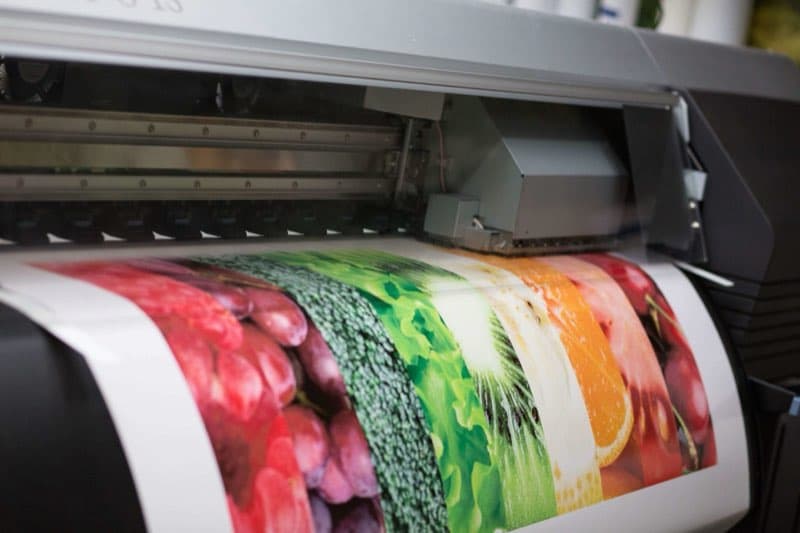
Wide format inkjet printers (often called "large format" printers) handle roll-fed media typically from 24 inches to 64 inches wide. The length is limited only by the roll of media — meaning you can print virtually unlimited length on roll substrates. This covers banners, trade show graphics, backlit films, and most commercial signage.
Grand format printers (used for building wraps and billboards) can print even wider, with virtually unlimited length on roll substrates. For prints larger than our in-house equipment handles, VSL Print can produce panels that are seamed together for a seamless final installation.
Maximum Print Sizes at VSL Print
- Standard digital press: Up to 13 x 19 inches
- Large format roll inkjet: Up to 60 inches wide x any length
- Flatbed UV printer: Rigid substrates up to approximately 4 x 8 feet per pass
For oversized projects, we produce and seam multiple panels. Our installation team handles final mounting and seaming for large-scale wall murals and building graphics.
Tips for High-Quality Digital Prints at Large Sizes
- Resolution scales with viewing distance: 300 DPI for close-view items; 100–150 DPI for typical signage; 72 DPI for billboard-scale. Do not build oversized files at 300 DPI — they become unmanageably large and the extra resolution is invisible.
- Use vector artwork for logos and text: Vectors scale infinitely without quality loss at any size.
- Avoid heavy JPEG compression: Compression artifacts invisible on a small screen become obvious at 10 feet wide. Use TIFF or high-quality JPEG for final output files.
- Preview at 25%: When working on very large files in Photoshop or Illustrator, preview at 25% zoom to simulate viewing distance.
- Print a section proof: For critical large format jobs, ask for a printed section proof at actual size before running the full job.
Sheet-Fed, Roll-Fed, and Flatbed: How Size Is Determined
Maximum print size is really a question of which press architecture handles your job. Sheet-fed digital presses are bounded by their maximum sheet — roughly 13 x 19 inches — but deliver excellent small-format quality and color control for cards, brochures, and booklets. Roll-fed inkjet takes media from a continuous roll, so width is the only real limit (commonly 24 to 64 inches) while length is virtually unlimited — the architecture behind banners and long graphics. Flatbed UV printers print directly onto rigid sheets up to a fixed bed size per pass, typically around 4 x 8 feet. Each architecture has a different "maximum," which is why the honest answer to "how big can you print?" is "it depends on the press and the material" — and why a shop with all three covers the full size range. Small-format work coming off those sheet-fed presses can be elevated further with soft-touch coating, a finishing step we run in-house.
Color Consistency Across Sizes
A subtle challenge with large prints is keeping color consistent both within a single piece and across multiple panels. On a tiled wall mural, two adjacent panels printed minutes apart must match exactly, or the seam will reveal a color jump. We manage this through calibrated color profiles and by printing panels for the same job together under the same conditions. The same discipline keeps a small printed sample and the full-size graphic reading as the same brand color. This is where calibrated, standards-based color management earns its value — at scale, even a slight drift between panels becomes glaringly visible, so consistency is engineered in rather than hoped for.
The Resolution-and-Distance Relationship
The most useful concept for large prints is that required resolution drops as viewing distance grows. Your eye can only resolve so much detail at a given distance, so once an image is sharp enough for its viewing distance, adding more DPI is invisible — it only bloats the file and slows production. A handheld business card is viewed at roughly 12 inches and needs 300 DPI. A wall graphic viewed at 4 to 6 feet looks crisp at 100 to 150 DPI. A billboard viewed from across a street is perfectly sharp at 20 DPI or less. This is why a "low-resolution" billboard file is not a quality problem; it is correctly matched to its distance. Building everything at 300 DPI regardless of size is a common and costly mistake.
Seaming and Panel Layout for Oversized Prints
When a graphic is wider than the press, we split it into panels and join them. The art of seaming is in placement: a seam tucked along an architectural line, behind a column, or in a low-detail background area becomes invisible, while a seam running through a face or logo draws the eye. For tiled wall murals, we plan the panel layout around the wall's features and the installation sequence. Overlap seams hide better on textured walls; butt seams suit smooth substrates. Telling us the wall dimensions and any obstructions lets us lay out panels that disappear once installed.
Frequently Asked Questions
What is the largest single piece you can print without seams? Roll-fed media prints continuous length up to the press width, so length is rarely the constraint — width is. Anything wider than the roll is paneled and seamed.
Will a huge file be too big to send? Use a transfer service like Dropbox or WeTransfer. Flattening layers and using TIFF or high-quality compression keeps files manageable without visible quality loss.
Can I see a sample before the full run? Yes. For critical jobs we can print a section at actual size so you confirm color and detail before committing to the entire graphic.
What resolution should my file be for a large print? Match it to viewing distance: about 300 DPI for close-up items, 100 to 150 DPI for signage viewed at several feet, and as low as 20 to 72 DPI for billboard-scale graphics seen from far away. Building everything at 300 DPI wastes file size and slows production without adding visible quality.
Will the seams on a paneled graphic be obvious? Not when planned well. We place seams in low-detail or architecturally logical areas — along lines, behind features, or in plain backgrounds — so they effectively disappear once installed. Sharing the wall dimensions and any obstructions lets us lay out panels for the cleanest result.
Need to Go Big? VSL Print Can Handle It.
From a single poster to a full-building wrap, VSL Print has the in-house equipment and experience to produce high-quality digital prints at any scale. Contact us at (646) 843-0800 or visit us at 239 West 29th Street in Manhattan to discuss your project.
Looking for professional digital printing services?
View Digital Printing ServicesReady to start your print project?
Get a free quote from a NYC commercial printer. Rush turnaround available.